If you post a public Snapchat Story, it’s natural to wonder who saved a screenshot of it. Snapchat does provide information about Story views and screenshot activity, but public Stories work differently from ordinary friend-only Stories. The important detail is that Snapchat’s current Public Profile Insights show a screenshot count, while its standard Story viewer tools can show viewer names in supported Story views. Snapchat’s official documentation does not currently describe a feature that gives Public Story creators a complete named list of everyone who screenshotted a public Snap.
So, if you’re trying to find out who screenshotted your public Snapchat Story, you need to check the correct Story area first. This guide explains where to look, what the screenshot number means, what Snapchat+ can and cannot do, and why some methods you may see online don’t actually reveal the person behind a screenshot.
Can You See Who Screenshotted Your Public Snapchat Story?
Short answer: You can check whether screenshots occurred and see the number of screenshots for Public Story content through Snapchat’s Insights. However, Snapchat’s current official documentation describes this metric as a count rather than a named list of people who took those screenshots.
Snapchat defines the Public Story Screenshots metric as the number of times a viewer has screenshotted your Snap. That is different from the Viewers metric, which represents the number of unique people who watched your Story.
This distinction matters because one person can potentially contribute more than one screenshot.
| Snapchat metric | What it tells you |
| Views | Total views across individual Snaps |
| Viewers | Number of unique viewers |
| Screenshots | Number of times viewers screenshotted a Snap |
| Replies | Number of Story replies |
| Average View Time | Average time viewers spent watching |
| Total View Time | Combined viewing time |
Snapchat lists these metrics under its Public Story Insights documentation.
Also Read: How to Tell If Someone Has Snapchat Premium?
How to Check Screenshots on a Public Snapchat Story?
If you have a Public Profile, Snapchat provides Story analytics through the Insights area.
Step 1: Open Snapchat
Launch the Snapchat app and sign in to the account that posted the public Story.
Step 2: Open your Public Story
Go to your profile and open the relevant Public Story or Story content.
Step 3: Open Story Insights
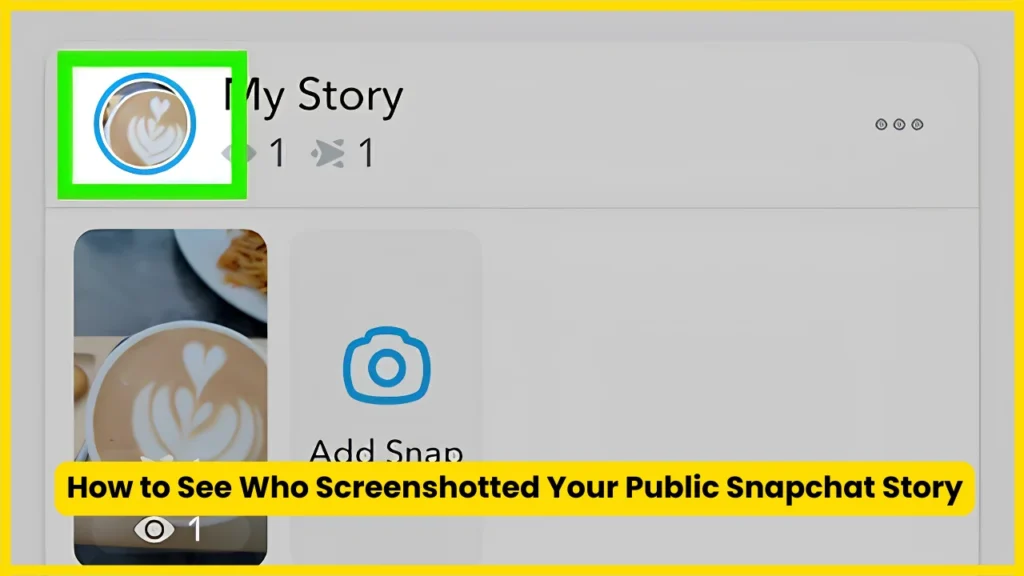
Snapchat says that you can tap your public Story Snap and swipe up to view Insights and Replies. The viewer information appears in this area.
Step 4: Look for the screenshot metric
For Public Stories, Snapchat’s Insights can show metrics including:
- Views
- Viewers
- Screenshots
- Swipe-ups or clicks
- Interactions
- Average View Time
- Total View Time
Snapchat says that in the Recents section of Public Profile Insights, you can select a Story tile and view metrics for individual Snaps, including screenshots.
Step 5: Interpret the number correctly
If Snapchat shows a screenshot count, that number represents screenshot activity. It doesn’t automatically mean that the same number of different people screenshotted your Story.
For example, if your Insights show:
Screenshots: 5
that means Snapchat recorded five screenshot events for the relevant content. It shouldn’t automatically be interpreted as five unique Snapchatters.
Does Snapchat Show the Name of Someone Who Screenshotted a Public Story?
This is where many Snapchat guides become confusing.
Snapchat’s current creator documentation defines Screenshots as a numerical metric: the number of times a viewer has screenshotted your Snap. Its Public Story documentation also explains that viewer information and screenshot statistics are available through different Story Insights.
Therefore, you shouldn’t assume that a screenshot count gives you a corresponding list of usernames.
There is an important difference between:
“Someone screenshotted my Story.”
and
“Snapchat told me exactly who screenshotted my Public Story.”
The first can be represented through Snapchat’s screenshot metric. The second is not described as a standard named feature for Public Story Insights in Snapchat’s current support documentation.
Also Read: How to Delete Stickers on Snapchat
How to See Who Viewed Your Public Snapchat Story?

Although screenshot identity is different, Snapchat does let Public Story creators check viewers.
According to Snapchat Support:
- Open your public Story Snap.
- Swipe up.
- Open Insights and Replies.
- Look under Viewers.
- Review the available viewer information.
Snapchat states that friends, followers, and other Snapchatters who viewed your public Story can appear under Viewers.
This can help you identify people who watched your Story, but don’t confuse the viewer list with a confirmed screenshot list.
Someone appearing as a viewer doesn’t prove that they took a screenshot.
Public Story Viewers vs. Screenshotters
These two concepts are closely related but aren’t interchangeable.
| Feature | Viewer | Screenshot |
| Shows that someone watched | Yes | Not necessarily |
| Counts unique viewers | Yes | No |
| Measures screenshot activity | No | Yes |
| Can identify a viewer | Supported in viewer information | Not presented as a complete named Public Story list |
| Available through Public Story Insights | Yes | Yes |
| Proves a person saved your Snap | No | Screenshot activity indicates it occurred |
Snapchat specifically defines Viewers as the number of unique viewers and Screenshots as the number of times a viewer screenshotted a Snap.
That difference is one of the most important things to understand when checking your Public Story analytics.
Also Read: How to Unpin Someone on Snapchat
What If You Have Snapchat+?
Snapchat+ adds several Story-related features, but it doesn’t mean that every Story interaction becomes identifiable.
For example, Snapchat+ includes Story View Notifications. This feature lets subscribers receive a notification the first time a selected friend views their Story.
Snapchat+ also offers Story Timestamps, which can show when friends viewed your Stories. Snapchat says these timestamps appear underneath a viewer’s name when you swipe up to see who viewed your Stories.
However, these features concern Story views, not a special tool that reveals the identity of every person who screenshots a Public Story.
Snapchat+ Features Related to Stories
| Snapchat+ feature | Purpose |
| Story View Notifications | Alerts you when a selected friend views your Story for the first time |
| Story Timestamps | Shows when friends viewed your Stories |
| Public Story Insights | Provides creator analytics where available |
| Screenshot metric | Measures screenshot activity on applicable content |
The important takeaway is simple: Snapchat+ doesn’t turn screenshot counts into a guaranteed named list of screenshotters.
Why Can’t You Always See the Person Who Screenshotted Your Public Story?
Public Stories are designed for broader distribution. Your content can be viewed by followers and other Snapchatters, depending on how and where the public content is surfaced. Snapchat explains that a Public Story can be available to followers and can also be shown to non-followers through public discovery surfaces.
That creates a different analytics model from a small, friend-based Story.
Snapchat therefore provides creator metrics such as:
- Unique viewers
- Snap views
- Screenshot counts
- Average view time
- Total view time
- Interactions
- Replies
- Clicks
These metrics help creators understand how content performs without necessarily providing a personal identity for every action.
Also Read: Snapchat Moons
Can You See Who Screenshotted a Normal Snapchat Story?
The answer can differ when you’re dealing with a regular Story rather than a Public Story.
Snapchat’s support documentation for My Story says that users can check who viewed their Story or took a screenshot by opening My Story and swiping up. Snapchat also says that names of up to 200 Snapchatters who viewed a Story can be displayed.
That is one reason online advice about Snapchat screenshots can appear contradictory.
Someone may be describing the behavior of a normal My Story while another person is talking about a Public Story and Public Profile Insights.
Normal My Story vs. Public Story
| Story type | Viewer information | Screenshot information |
| My Story | Viewer names can be shown within Snapchat’s limits | Snapchat provides screenshot indication |
| My Story · Public | Public Story viewer information and Insights | Screenshot metric available |
| Public Profile Story | Viewer and creator analytics | Screenshot count available in Insights |
| Private Story | Limited to selected friends | Screenshot activity can be indicated |
Snapchat also notes that people who can view Private Stories can screenshot or screen record them, so creators should only share content they are comfortable having saved or shared.
How Many People Can Snapchat Show in Your Viewer List?
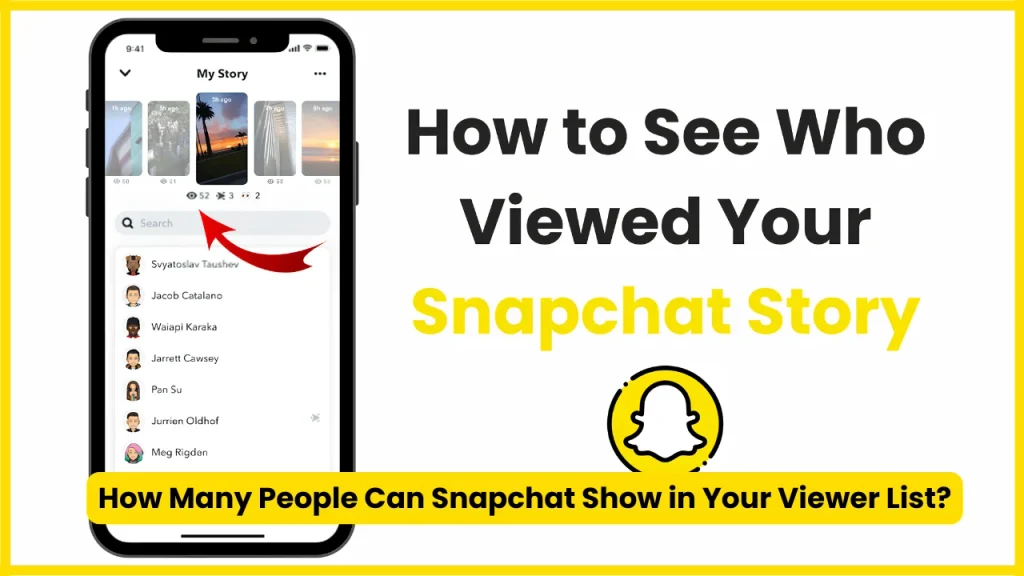
For ordinary My Story content, Snapchat says it can show the names of up to 200 Snapchatters who viewed your Story. After that, you see a number rather than additional names.
This limit is another reason not to assume that your viewer list represents every person who interacted with a widely distributed Story.
Public Story Insights work more like creator analytics, with metrics that help you measure overall engagement.
Also Read: What Does the Green Dot Mean on Snapchat?
Does a Screenshot Count Mean One Person Took One Screenshot?
Not necessarily.
Snapchat defines screenshots as the number of times a viewer has screenshotted your Snap. Because this is an event-based metric, it shouldn’t automatically be treated as a count of unique people.
For example, imagine your Public Story receives:
- 1,000 views
- 600 unique viewers
- 12 screenshots
The 12 screenshot events don’t necessarily represent 12 different Snapchatters.
The safest interpretation is:
Your Snap generated 12 recorded screenshot events.
Avoid turning that number into a list of individuals without evidence from Snapchat itself.
Can Third-Party Apps Show Who Screenshotted Your Snapchat Story?
Be cautious with websites and apps claiming they can reveal hidden Snapchat screenshot identities.
A third-party service cannot legitimately guarantee access to private Snapchat data simply because you enter a username or Story URL.
Be especially careful if a service asks you to:
- Enter your Snapchat password
- Provide a verification code
- Install an unknown app
- Connect your Snapchat account
- Pay for “hidden screenshot data”
- Disable security features
- Download an unfamiliar browser extension
There is no good reason to give an unknown service your Snapchat login credentials just to obtain information that Snapchat doesn’t publicly expose.
If Snapchat’s own Public Story Insights show a screenshot count but not a named screenshot list, an outside website claiming to reveal the hidden identities deserves serious skepticism.
Also Read: How to Half Swipe on Snapchat
Can Someone Screenshot Your Story Without You Knowing?
You should assume that people can save or capture content you post.
A screenshot notification system isn’t the same thing as a complete protection mechanism. Someone might use another device to photograph the screen, for example, which is fundamentally different from taking a screenshot through Snapchat.
Snapchat itself warns that people who can view certain Stories can screenshot or screen record the content.
So the practical privacy rule is straightforward:
Don’t post publicly anything you wouldn’t want another person to save.
What About Screen Recording?
Screen recording is another reason screenshot information shouldn’t be treated as a complete record of everything someone has saved.
A screenshot is a specific capture event. Screen recording involves recording moving content, and Snapchat’s available analytics shouldn’t be interpreted as an absolute guarantee that no copy exists simply because you don’t see a screenshot event.
For sensitive content, privacy settings are more important than relying on notifications.
How to Protect Your Snapchat Story From Unwanted Screenshots?
If you’re uncomfortable with people saving your content, adjust who can access it rather than relying entirely on screenshot notifications.
Use a More Restricted Story
Snapchat provides different Story options. Public Stories are designed for broad visibility, while other Story settings can restrict who can see your content.
Review Your Privacy Settings
For My Story, Snapchat’s support documentation explains that privacy settings can be accessed through:
Profile → Settings → App & Privacy → My Privacy & Data → View My Story
Depending on your account and available options, you can choose who can view your Story.
Think Before Posting Sensitive Content
Even if Snapchat indicates a screenshot, you can’t control what someone does with a saved copy afterward.
Avoid posting:
- Private documents
- Passwords
- Financial information
- Personal identification
- Sensitive conversations
- Private images
- Information about another person without permission
Public posting should always be treated as potentially permanent.
Also Read: What Does NRS Mean on Snapchat?
Why Your Snapchat Screenshot Count May Be Different From Your View Count?
A Story can have thousands of views and only a small number of screenshots.
That’s normal.
A view means someone watched your Snap. A screenshot is a separate engagement action. Snapchat tracks them as different metrics in Public Story Insights.
For example:
| Metric | Example |
| Snap Views | 2,500 |
| Unique Viewers | 1,900 |
| Screenshots | 24 |
| Replies | 18 |
| Clicks | 40 |
These numbers describe different behaviors.
A person can watch without saving anything. Another viewer might screenshot immediately. Someone else could watch several times without creating the same type of interaction.
What Does “Screenshots” Mean in Snapchat Insights?
In Snapchat’s creator glossary, Screenshots means the number of times a viewer has screenshotted your Snap.
This is useful because it gives creators a measurable signal of audience behavior.
A high screenshot count may indicate that viewers found information, an image, announcement, product, outfit, quote, or other content worth keeping. But the number alone doesn’t tell you why someone took the screenshot.
Analytics show behavior. They don’t automatically explain intent.
What Does “Viewers” Mean in Snapchat Insights?
Snapchat defines Viewers as the number of unique viewers for your Story.
That’s different from total Snap Views.
Suppose 500 unique people watch your Story, but several of them view multiple Snaps. Your total Snap Views can be higher than your unique viewer count.
This is why you should always check the metric label before interpreting your Snapchat analytics.
Also Read: What Do the Snapchat Planets Mean?
Does Snapchat Notify You When Someone Screenshots a Public Story?
Snapchat provides screenshot information for Stories and Public Story analytics, but the exact presentation depends on the type of Story and the relevant Snapchat feature.
For regular My Story content, Snapchat explicitly says you can check who viewed the Story or took a screenshot by opening the Story and swiping up.
For Public Stories, Snapchat’s current creator documentation emphasizes the Screenshots metric in Public Profile Insights.
So, if you’re asking specifically about a Public Snapchat Story, check the Insights rather than assuming that a notification will provide the name of every screenshotter.
Common Snapchat Screenshot Myths
“Snapchat+ lets you see every person who screenshots your Public Story.”
Not according to Snapchat’s current documented Snapchat+ features. Snapchat+ includes Story View Notifications and Story Timestamps, but those features relate to Story viewing.
“The screenshot number equals the number of people who screenshotted it.”
Not necessarily. Snapchat defines the metric as the number of screenshot events, not unique screenshotters.
“A viewer list proves who took a screenshot.”
No. A viewer list identifies people who viewed the Story. It doesn’t establish that each listed viewer captured the Snap.
“A third-party Snapchat tracker can reveal hidden screenshotters.”
Treat such claims with caution. Don’t provide your Snapchat credentials to an untrusted service.
“If Snapchat doesn’t show a screenshot notification, nobody saved it.”
That conclusion isn’t safe. People can capture content in ways that don’t necessarily correspond to a Snapchat screenshot event.
A Simple Way to Check Your Public Story
If you only want the practical steps, use this quick checklist:
- Open Snapchat.
- Go to your Profile.
- Open your Public Story.
- Tap the relevant Snap.
- Swipe up.
- Open Insights and Replies where available.
- Review Viewers.
- Check the Screenshots metric in your Public Profile Insights.
- Treat the screenshot number as screenshot activity, not automatically as a list of unique people.
Snapchat confirms that Public Story Insights can display views, viewers, screenshots, swipe-ups, and interactions for individual Snaps.
Frequently Asked Questions
Can I see who screenshotted my public Snapchat Story?
You can check the screenshot metric for your Public Story through Snapchat Insights. Snapchat currently documents this as a screenshot count rather than a complete named list of screenshotters.
How do I check screenshots on my Snapchat Public Story?
Open your Public Story, select the relevant Snap, and swipe up to access available Insights. Public Profile Insights can show a Screenshots metric for Public Stories.
Does Snapchat show who screenshotted a Public Story?
Snapchat’s current Public Story documentation describes screenshots as a numerical metric. It does not document a standard feature that provides creators with a complete named list of people who screenshotted a Public Story.
Can Snapchat+ show who screenshotted my Story?
Snapchat+ offers Story View Notifications and Story Timestamps, but those features concern Story views. They don’t establish that Snapchat+ provides a complete named list of Public Story screenshotters.
Can I see who viewed my public Snapchat Story?
Yes. Snapchat says you can open your public Story Snap, swipe up, and view available viewer information under Viewers.
Does a screenshot count represent unique people?
No. Snapchat defines Screenshots as the number of times viewers screenshotted a Snap. It is not defined as the number of unique screenshotters.
Can someone screenshot my Snapchat Story without me knowing?
You shouldn’t assume Snapchat can detect every possible way someone might save your content. Someone could use another device to photograph the screen, for example.
Are third-party Snapchat screenshot trackers reliable?
Be skeptical of services claiming to reveal hidden Snapchat data. Never give an unknown service your Snapchat password or verification code simply because it promises a list of screenshotters.
Why can I see viewers but not who screenshotted my Public Story?
Snapchat treats viewer information and screenshot activity as separate analytics. Public Story Insights can provide viewer information alongside a numerical screenshot metric.
How many Snapchat Story viewers can I see by name?
For regular My Story content, Snapchat says names of up to 200 Snapchatters can be displayed. After 200 views, you see a number rather than additional names.
Also Read: Snapchat Planets Numbered
Conclusion
If you’re trying to find out who screenshotted your public Snapchat Story, start with Public Profile Insights rather than third-party tracking apps. Snapchat currently provides a screenshot count for Public Stories, while viewer information is presented separately. A screenshot count doesn’t automatically identify unique people. For privacy, assume public content can be saved and adjust your Story audience when necessary.

Tasha Harshman is a versatile writer who explores a range of topics with a special focus on entertainment. She enjoys sharing clear, engaging insights about movies, celebrities, trends, and pop culture.