
Introduction
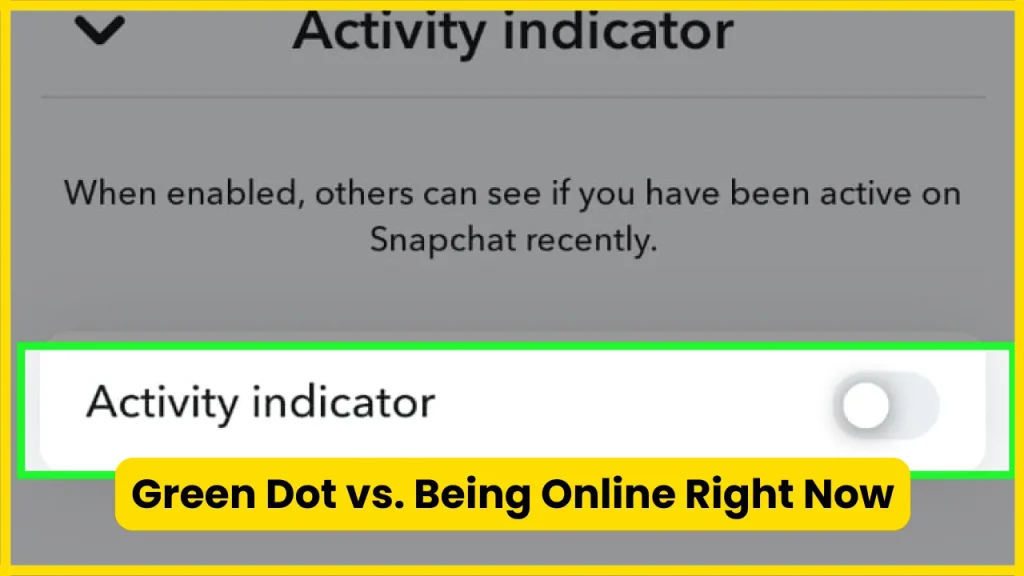
If you have noticed a small green dot next to someone’s avatar on Snapchat, you may have wondered if it means that person is online right now. The answer is slightly different from what many people assume. Snapchat calls this feature the Activity Indicator, and its official support page says the green dot means a friend has been active on Snapchat recently.
The important distinction is that recently active does not necessarily mean currently online. The green dot is a general activity signal, not a live promise that someone is looking at Snapchat, reading your message, or ready to reply.
What Does the Green Dot Mean on Snapchat?
The green dot on Snapchat means that the person has been active on Snapchat recently.
Snapchat displays the green dot on a friend’s avatar when its Activity Indicator is available. Snapchat also says the indicator can be disabled by the account owner.
In simple terms:
Green dot = recently active on Snapchat.
It does not automatically mean:
- They are online right now.
- They are looking at your chat.
- They have seen your message.
- They are ignoring you.
- They are available to talk.
- They are using Snapchat at this exact second.
This distinction matters because Snapchat does not present the green dot as a real-time online-status indicator.
Is the Green Dot an Online Status?
Not exactly.
The easiest way to understand it is to think of the green dot as a recent activity signal rather than a live presence indicator.
For example, imagine you see a green dot beside someone’s avatar. That tells you Snapchat has detected recent activity from that account. It does not tell you exactly what the person was doing or whether they are still using the app.
They could have:
- Opened Snapchat earlier.
- Viewed Stories.
- Sent or received Snaps.
- Checked their chats.
- Browsed other parts of the app.
- Closed Snapchat afterward.
So if someone has a green dot but has not replied to you, the dot alone is not enough evidence to conclude that they are currently online or deliberately ignoring you.
Also Read: How to Half Swipe on Snapchat
How Snapchat’s Green Dot Activity Indicator Works?
Snapchat’s official explanation is intentionally simple: the green dot indicates that a friend has been active recently, and the indicator remains visible unless the person disables it.
That gives us three useful pieces of information.
1. It Indicates Recent Activity
The primary purpose of the green dot is to communicate recent Snapchat activity.
It gives you a quick visual clue without requiring you to open a conversation or ask the person whether they are using the app.
2. It Does Not Give an Exact Activity Time
The green dot does not display a timestamp such as:
- Active 5 minutes ago
- Active 20 minutes ago
- Active 2 hours ago
Snapchat’s official support documentation simply uses the term recently rather than publishing a precise number of minutes or hours.
That means you should not treat the green dot as a precise activity clock.
3. Users Can Turn the Indicator Off
Snapchat allows users to disable their Activity Indicator through the privacy settings.
If someone has turned it off, you may not see the green dot even if they have recently used Snapchat.
This is one of the biggest reasons why the absence of a green dot should not be interpreted as proof that someone has not been using Snapchat.
Also Read: What Does NRS Mean on Snapchat?
Green Dot vs. Being Online Right Now
This is probably the most common question surrounding the feature.
Does a Green Dot Mean Someone Is Online on Snapchat Right Now?
No, not necessarily.
Snapchat officially describes the green dot as showing recent activity, not guaranteed real-time presence.
Think of it this way:
| What you see | What you can reasonably conclude |
| Green dot appears | The person has been active recently |
| No green dot | You cannot reliably conclude they have not used Snapchat |
| Green dot + no reply | They may have been active, but this does not prove they saw or ignored your message |
| Green dot disappears | You cannot use that alone to determine exactly when they stopped using Snapchat |
| Activity Indicator disabled | Other users may not receive the recent-activity signal |
The green dot is therefore useful, but it should not be treated as a live “online now” label.
Also Read: What Do the Snapchat Planets Mean?
Does the Green Dot Mean They Are Talking to Someone Else?
No.
The green dot does not tell you who someone is communicating with or what they are doing inside Snapchat.
Seeing the indicator does not prove that the person is:
- Chatting with another friend
- Sending Snaps
- Watching your Story
- Viewing someone else’s Story
- Looking at your profile
- Typing a message
- Reading your conversation
It only communicates recent activity.
That distinction prevents a lot of unnecessary assumptions.
Does the Green Dot Mean Someone Saw Your Message?
No.
A green dot and a message being opened are two different things.
If you send someone a Chat or Snap and notice a green dot beside their avatar, that does not automatically mean they have opened what you sent.
The green dot is an activity signal. It is not a replacement for Snapchat’s message or Snap status indicators.
So:
Green dot ≠ message opened
and
Green dot ≠ reply coming
This is particularly important when trying to interpret someone’s behavior on Snapchat.
Why Do I See a Green Dot on Some People but Not Others?
There are several possible reasons.
They Were Recently Active
The most straightforward explanation is that Snapchat has detected recent activity and is displaying the Activity Indicator.
They Disabled Activity Indicator
Snapchat allows users to turn the feature off. When they disable it, other Snapchatters will not receive that particular recent-activity signal from their account.
Snapchat’s Interface May Vary
Snapchat regularly changes its interface, menu organization, and feature placement. The exact location where you encounter the indicator can therefore vary depending on your app version and interface.
The underlying meaning, however, remains the important part: Snapchat identifies the green dot as an indication of recent activity.
Also Read: Snapchat Planets Numbered
How Long Does the Green Dot Stay on Snapchat?
This is an area where you should be careful with claims found online.
Many websites state a specific time period, such as 24 hours. However, Snapchat’s current official support page does not specify an exact number of hours in its explanation. It simply says that the green dot indicates a friend has been active recently.
Therefore, the safest and most accurate answer is:
Snapchat does not currently document a precise public duration for the green-dot Activity Indicator on its official support page.
That means you should not use the green dot as an exact timer.
If a website claims that the indicator always remains visible for exactly a particular number of hours, treat that statement cautiously unless it is supported by current Snapchat documentation.
Can You Turn Off the Green Dot on Snapchat?
Yes.
Snapchat provides an Activity Indicator privacy setting that allows you to control whether other Snapchatters can see that you have been active recently. Snapchat’s current support instructions provide the following route.
How to Turn Off Your Snapchat Green Dot
- Open Snapchat.
- Tap your Profile icon.
- Tap the Settings gear.
- Scroll to App & Privacy.
- Tap My Privacy & Data.
- Scroll to Privacy Choices.
- Tap Activity Indicator.
- Turn the setting off.
Snapchat’s official documentation confirms this current path.
The exact wording or location of menus can change with future Snapchat updates, so if your app looks slightly different, search your privacy settings for Activity Indicator.
Also Read: Best Friend List Snapchat Planets
What Happens When You Turn Off Activity Indicator?
Turning off the Activity Indicator removes that particular recent-activity signal from your profile visibility.
In practical terms, you are telling Snapchat that you do not want other Snapchatters to see the green-dot indication associated with your recent activity.
However, this does not mean that your entire Snapchat presence becomes invisible.
Other Snapchat features have their own privacy controls.
For example, Snapchat separately provides privacy settings relating to Stories, location, contact preferences, Find Friends, and other aspects of your account.
So disabling the green dot should be viewed as one privacy setting, not a complete privacy mode.
Does Turning Off the Green Dot Hide Your Snapchat Location?
No.
The Activity Indicator and Snap Map privacy are separate concepts.
If your goal is to control who can see your location, you need to review your Snap Map and location-sharing settings separately.
Turning off Activity Indicator should not be treated as equivalent to enabling Ghost Mode or hiding your location.
Snapchat provides separate controls for different types of visibility, which is why checking the relevant privacy setting is better than assuming one switch controls everything.
Green Dot vs. Other Snapchat Indicators

Snapchat uses several visual signals, and it is easy to confuse them.
| Snapchat signal | General purpose | Does it mean the person is online now? |
| Green dot | Recent activity | No, not necessarily |
| Chat opened/read status | Indicates an interaction with your Chat | No |
| Typing indicator | Indicates typing activity in a conversation | More immediate, but not the same as the green dot |
| Snap status | Shows whether a Snap has been opened or is pending | No |
| Snap Map location | Shows location according to location-sharing settings | No |
| Story view | Shows that a Story was viewed | No |
The key point is that these features answer different questions.
The green dot answers a broad question:
“Has this person been active recently?”
It does not answer:
“Are they looking at Snapchat right now?”
Also Read: Snapchat Planets Meaning
What Does the Green Dot Mean Next to a Friend’s Avatar?
If you see a small green dot beside a friend’s avatar, Snapchat is using the Activity Indicator to show that the friend has been active recently.
This can appear as part of Snapchat’s friend-related interface.
The green dot is therefore associated with activity, not with the person’s Bitmoji appearance, Snapscore, Story activity, or location.
Does the Green Dot Mean They Are Active on Snapchat Even If They Are Not Replying?
It can mean that they have been active recently, but you cannot use it to establish why they have not replied.
There are many ordinary explanations:
- They opened Snapchat briefly.
- They checked another conversation.
- They watched Stories.
- They sent a Snap.
- They were busy and closed the app.
- They saw the app notification but did not respond.
- They have not yet opened your particular message.
The green dot does not provide enough information to distinguish between these situations.
This is why interpreting it as “they are online and deliberately ignoring me” goes beyond what the feature actually tells you.
Does Snapchat Green Dot Mean They Are Available to Chat?
No.
Recent activity and availability are different things.
Someone can open Snapchat for 30 seconds while waiting for a bus, check one notification, and close the app. The Activity Indicator may still provide a recent-activity signal, but that does not mean the person is available for a conversation.
If you need to know whether someone is actually available, the green dot alone is not a reliable way to determine that.
Also Read: Snapchat Planets Order
Can You Hide the Green Dot From Only One Person?
Snapchat’s official documentation describes an Activity Indicator toggle, rather than a documented per-person control for hiding the indicator from one specific friend.
So if your goal is to selectively hide recent activity from one particular person while leaving the indicator visible to everyone else, do not assume Snapchat provides that option.
The documented control is the broader Activity Indicator setting.
Does Snapchat+ Control the Green Dot?
The Activity Indicator is documented by Snapchat as a privacy setting. Snapchat’s official instructions do not state that Snapchat+ is required to turn the Activity Indicator on or off.
If you are researching Snapchat+ features, it is better to distinguish those subscription features from standard privacy controls.
The green-dot setting should not automatically be associated with Snapchat+ simply because other Snapchat features are subscription-based.
Why the Green Dot Can Be Misleading?
The biggest problem with the green dot is not the feature itself. It is how people interpret it.
A small green indicator looks similar to the “online now” indicators used by many messaging and social platforms.
That visual language can make users assume:
“This person is online right now.”
But Snapchat’s own wording is more limited. It says the person has been active recently.
That difference is small in wording but significant in practice.
A Better Way to Interpret It
Instead of thinking:
“They are online.”
Think:
“Snapchat indicates that they have been active recently.”
That interpretation stays much closer to what the platform actually confirms.
Common Green Dot Questions Answered Quickly
Does a green dot mean someone is online?
Not necessarily. Snapchat says it indicates recent activity, not guaranteed real-time presence.
Does the green dot mean someone is chatting?
No. It does not reveal what the person is doing inside Snapchat.
Does it mean they saw my message?
No. The green dot is not a message-read indicator.
Can I turn off my green dot?
Yes. Go to Profile → Settings → App & Privacy → My Privacy & Data → Privacy Choices → Activity Indicator and turn it off.
Does turning it off hide my location?
No. Activity Indicator and location privacy are separate controls.
Does no green dot mean someone has not used Snapchat?
Not necessarily. They may have disabled their Activity Indicator.
Does Snapchat tell you the exact time someone was active?
The green dot itself does not provide an exact activity timestamp.
Can the green dot prove someone is ignoring you?
No. It only indicates recent activity and does not reveal whether they saw your message or why they have not replied.
Also Read: How to Unpin Someone on Snapchat
Practical Privacy Tips for Snapchat Users
If you care about controlling your Snapchat visibility, the green dot is only one setting worth reviewing.
Review Your Activity Indicator
If you do not want others to see your recent-activity signal, disable Activity Indicator through your privacy settings.
Review Location Sharing Separately
If location privacy is important to you, check your Snap Map settings separately. Turning off the Activity Indicator does not automatically change location sharing.
Review Story Privacy
Snapchat provides controls for who can see your Stories. These settings are independent of the Activity Indicator.
Do Not Treat Status Signals as Exact Evidence
A green dot, Story view, or other Snapchat indicator can provide useful context, but individual signals rarely tell the complete story.
This is particularly useful when interpreting someone’s response time or online behavior.
A Simple Real-World Example
Suppose you send a Snapchat message to a friend at 8:00 PM.
At 8:30 PM, you notice a green dot next to their avatar.
What can you say with reasonable confidence?
They have been active on Snapchat recently.
What can you not prove?
- They opened your message.
- They read your message.
- They saw your notification.
- They are currently using Snapchat.
- They are talking to someone else.
- They intentionally ignored you.
- They are going to reply soon.
This example captures the most important point about the feature.
The green dot provides context, not a complete activity report.
Why Snapchat Calls It an Activity Indicator?
The terminology itself provides a useful clue.
Snapchat calls the feature an Activity Indicator, rather than an “Online Now” indicator. Its official support documentation specifically explains the green dot as a signal that a friend has been active recently.
That naming helps explain why it should not be interpreted as a guaranteed live-status system.
The feature is designed to communicate recent activity in a quick visual format.
Featured Snippet Answer: What Does the Green Dot Mean on Snapchat?
The green dot on Snapchat is the Activity Indicator. It means that a friend has been active on Snapchat recently. It does not necessarily mean they are online right now, viewing your chat, or available to reply. Snapchat allows users to disable the Activity Indicator through Profile → Settings → App & Privacy → My Privacy & Data → Privacy Choices → Activity Indicator.
FAQs
1. What does the green dot mean on Snapchat?
The green dot means Snapchat indicates that the person has been active recently. Snapchat calls this feature the Activity Indicator.
2. Does the green dot mean someone is online right now?
No. It indicates recent activity rather than guaranteeing that the person is using Snapchat at that exact moment.
3. Does the green dot mean they are talking to someone?
No. It does not tell you what the person is doing inside Snapchat.
4. Does a green dot mean they opened my Snap?
No. The Activity Indicator should not be confused with an opened-Snap or read-status indicator.
5. Why does someone have a green dot but not reply?
The person may have been active recently without opening or responding to your particular message. The green dot does not explain their behavior.
6. Can I turn off the green dot?
Yes. Snapchat provides an Activity Indicator setting that you can disable from its privacy controls.
7. How do I turn off my activity indicator?
Go to Profile → Settings → App & Privacy → My Privacy & Data → Privacy Choices → Activity Indicator, then turn it off.
8. Does turning off Activity Indicator hide my Snap Map location?
No. Activity Indicator and location sharing are separate privacy settings.
9. Does Snapchat show exactly when someone was last active?
The green dot does not provide an exact time. Snapchat’s official explanation uses the term “recently” rather than giving a precise public duration.
10. If I cannot see a green dot, does that mean the person is offline?
Not necessarily. They may have disabled their Activity Indicator, so the absence of the dot is not conclusive evidence of inactivity.
11. Is the green dot connected to Snapchat’s Snapscore?
No. The Activity Indicator is a separate feature from Snapscore.
12. Is the green dot the same as Snapchat’s typing indicator?
No. The green dot indicates recent activity. A typing indicator relates specifically to activity within a chat.
13. Can I hide my green dot without deleting Snapchat?
Yes. You can disable the Activity Indicator without deleting your account.
14. Does Snapchat+ have to be enabled to use Activity Indicator?
Snapchat’s official instructions document Activity Indicator as a privacy setting and do not state that Snapchat+ is required.
15. Is the green dot accurate?
It is useful as an indication of recent activity, but it should not be treated as an exact real-time status or timestamp.
Also Read: Snapchat Dark Mode
Conclusion
The green dot on Snapchat is the Activity Indicator, and it means a friend has been active on Snapchat recently. It does not guarantee that they are online right now, reading your message, or available to chat. If you prefer more privacy, you can disable Activity Indicator through Snapchat’s privacy settings. Treat the green dot as a recent-activity clue, not an exact online-status tracker.

Tasha Harshman is a versatile writer who explores a range of topics with a special focus on entertainment. She enjoys sharing clear, engaging insights about movies, celebrities, trends, and pop culture.