Introduction
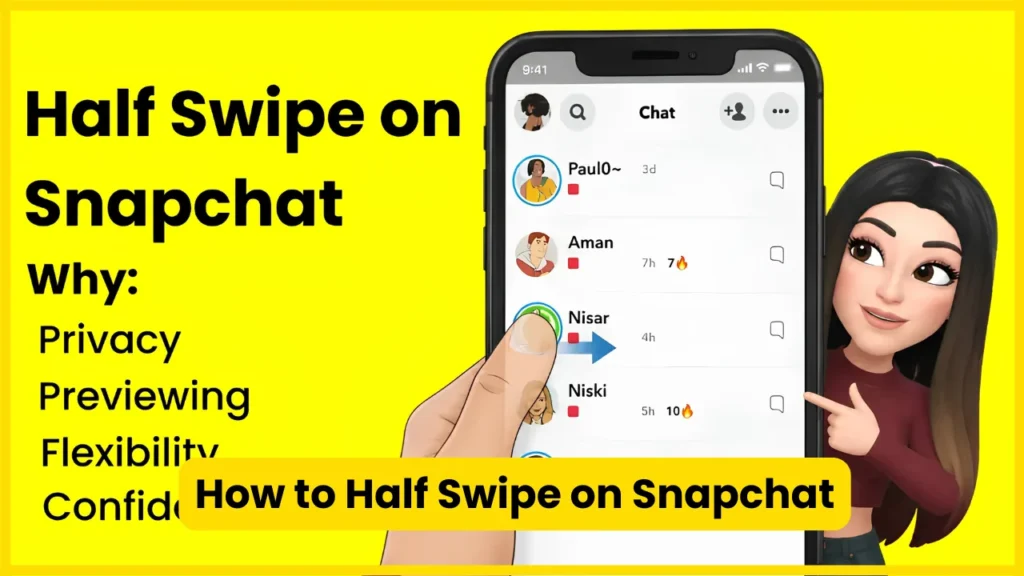
To half swipe on Snapchat, open the Chat screen, press and hold the friend’s Bitmoji or profile area, then slowly drag the conversation toward the right. Keep your finger on the screen while you preview the message. Before releasing, move the conversation back to its original position, then lift your finger.
The important part is that half swipe is not an official Snapchat feature. It is an unofficial gesture that has historically allowed users to preview parts of a text conversation without fully opening it. Its behavior can change with Snapchat updates, and Snapchat+ users may have access to Peek a Peek, which can reveal that someone is peeking into a conversation under certain conditions.
What Is a Half Swipe on Snapchat?
A half swipe is a Snapchat gesture that lets you partially reveal a Chat conversation instead of opening it normally.
The idea is straightforward:
- Find an unread Chat.
- Press and hold the person’s profile area.
- Slowly drag the conversation toward the right.
- Read the visible portion of the message.
- Drag the conversation back before releasing your finger.
When the technique works, the conversation is not fully opened. This is why people often search for terms such as “read Snapchat messages without opening,” “read Snapchat messages without them knowing,” and “Snapchat half swipe without seen.”
There is an important distinction, though. Snapchat’s own support documentation identifies Viewed Chat and Unread Chat states, but it does not document half swiping as an official privacy feature.
That means you should treat the technique as an interface behavior rather than a guaranteed Snapchat privacy setting.
Also Read: What Does NRS Mean on Snapchat?
How to Half Swipe on Snapchat Step by Step?
1. Open Snapchat
Launch the Snapchat app on your iPhone or Android phone.
From the Camera screen, swipe right to reach the Chat screen. Snapchat’s support documentation confirms that swiping right from Camera opens Chat.
2. Find the unread conversation
Look for the friend whose message you want to preview.
You should see the conversation in your Chat list. If the message is important, remember that half swiping is not risk-free. A poorly controlled gesture can open the conversation.
3. Press and hold the profile area
Place your finger on the friend’s Bitmoji or profile icon.
Do not simply tap the conversation.
The goal is to keep your finger pressed while beginning the gesture.
4. Slowly drag to the right
While continuing to hold the screen, slowly move your finger toward the right.
As the conversation slides across the screen, part of the Chat should become visible.
This is the actual “half swipe.”
5. Read the visible message
Once enough of the text is visible, read what you need.
Do not lift your finger while the conversation is partially open.
This is one of the most important parts of the technique. If you release the screen at the wrong point, the conversation can open normally.
6. Move the conversation back
Instead of releasing immediately, carefully drag the conversation back toward its original position.
Keep your finger pressed down.
Once the Chat has returned to its starting position, release the screen.
7. Check that you did not accidentally open the Chat
If you accidentally opened the conversation, Snapchat can register it as viewed.
There is no reliable “undo read receipt” button, so it is better to practice the gesture with a low-stakes conversation first.
Also Read: What Do the Snapchat Planets Mean?
How to Half Swipe on Snapchat on iPhone?
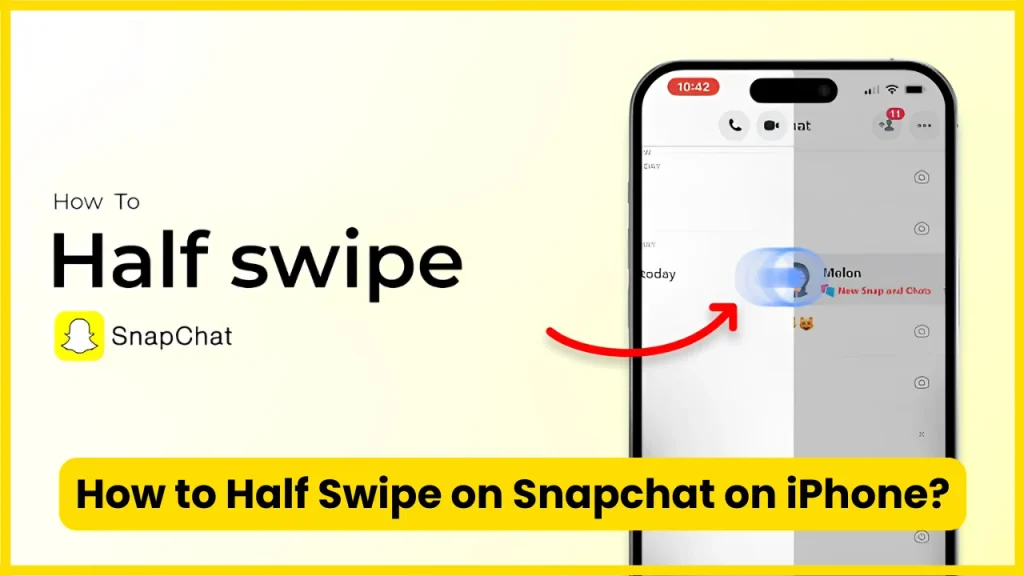
The basic process on an iPhone is:
- Open Snapchat.
- Go to Chat.
- Locate the unread conversation.
- Press and hold the friend’s Bitmoji/profile area.
- Slowly drag right.
- Read the visible text.
- Keep your finger down.
- Drag the conversation back.
- Release only after it returns to its original position.
The exact amount of movement is not a fixed percentage. You may see guides suggesting 50%, 60%, or another specific distance, but there is no official Snapchat measurement for a “correct” half swipe.
Your goal is simply to reveal enough of the Chat to read it without completing the normal opening gesture.
How to Half Swipe on Snapchat on Android?
The Android method is essentially the same:
- Open Snapchat.
- Enter the Chat screen.
- Locate the unread message.
- Press and hold the sender’s profile/Bitmoji area.
- Slowly drag the Chat toward the right.
- Preview the available text.
- Keep your finger on the display.
- Drag the conversation back.
- Release after it returns to the original position.
Different Android phones can feel slightly different because of display sensitivity, screen protectors, operating-system settings, and the Snapchat version installed on the device.
There is no reliable evidence that a particular Android manufacturer makes the half swipe universally better.
Also Read: Snapchat Planets Numbered
Does Half Swipe Still Work on Snapchat in 2026?
It can still work for some users, particularly for text Chats, but it is not guaranteed.
This distinction matters because many older articles describe half swiping as though it were a permanent Snapchat feature.
It is not.
Recent guides published in 2026 continue to report the gesture working, while also noting that Snapchat can change how the Chat interface responds to it.
Snapchat’s official documentation does not present half swipe as a supported feature. Therefore, an app update can potentially change the behavior without Snapchat needing to announce that it has “removed half swipe.”
Current compatibility at a glance
| Situation | Half swipe usefulness | What to know |
| iPhone | Often works for text Chats | Gesture requires careful finger control |
| Android | Often works for text Chats | Results can vary by device and app version |
| Text Chat | Best use case | Previewing text is the main purpose |
| Unopened photo/video Snap | Not reliable | Opening the Snap normally can mark it viewed |
| Snapchat Web | Not the same gesture | Half swipe is primarily a mobile interaction |
| Snapchat+ | Extra privacy concern | Peek a Peek can reveal peeking activity |
The safest way to think about it is “sometimes works” rather than “guaranteed invisible.”
Can Someone Tell If You Half Swiped on Snapchat?
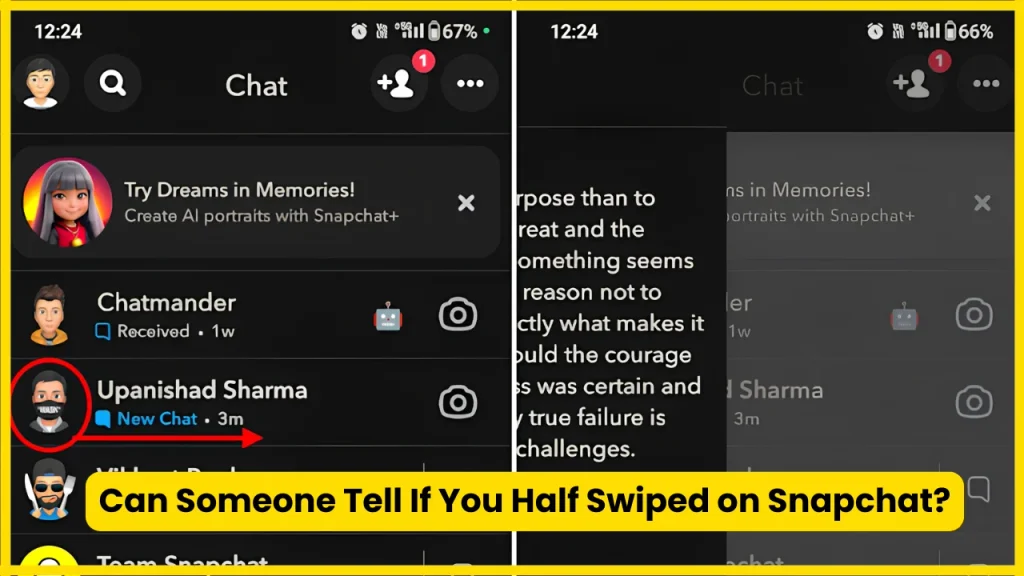
This is where many online guides become outdated.
A normal half swipe has traditionally been used to preview a Chat without fully opening it. However, Snapchat+ includes a feature called Peek a Peek that can show when someone is peeking into a conversation under certain circumstances.
Snapchat’s own support documentation also confirms that Snapchat+ subscribers can see when a friend is present in their Chat through the Friends in Chat feature.
So it would be inaccurate to promise:
“The other person will never know.”
A better rule is:
Half swipe can reduce the chance of sending the normal opened status, but it should not be treated as an invisible or guaranteed-private method.
Also Read: Best Friend List Snapchat Planets
What Is Snapchat+ Peek a Peek?
Peek a Peek is a Snapchat+ feature related to seeing when someone is peeking into a Chat.
This changes the privacy calculation around half swiping.
If you are using the technique specifically because you do not want another person to know that you are looking at their conversation, you should understand that Snapchat+ features can affect what the other person can see.
This is one of the most important differences between older half-swipe tutorials and current Snapchat usage.
Can You Half Swipe a Snapchat Photo or Video?
Not in the same reliable way as a text Chat.
The half-swipe technique is primarily associated with text messages inside Chats. An unopened Snap photo or video is different from a text message.
Snapchat distinguishes between unread Chats and unopened Snaps in its interface, and its icon documentation treats viewed Snaps separately from viewed Chats.
So if someone sends you:
- A text message: half swipe may let you preview it.
- An unopened photo Snap: do not assume half swipe will let you view it safely.
- An unopened video Snap: do not assume half swipe will prevent it from being marked viewed.
- Saved Chat content: behavior can differ depending on the current Snapchat interface.
The key mistake is treating every type of Snapchat message as if it behaves like a text Chat.
Can You Half Swipe a Snapchat Group Chat?
You should be more cautious with Group Chats.
The half-swipe gesture was primarily popular as a way to preview an individual Chat. Group Chat behavior can vary with Snapchat updates and the way the conversation is displayed.
If the message is important or sensitive, do not assume that the same behavior you experienced in a one-to-one Chat will work identically in a Group Chat.
Also Read: Snapchat Planets Meaning
Half Swipe vs Opening a Snapchat Chat
| Action | What happens |
| Tap the Chat normally | Opens the conversation |
| Half swipe | Partially reveals the Chat |
| Release while partially open | Can accidentally open the conversation |
| Drag back before releasing | Intended half-swipe technique |
| Open an unopened Snap | Can mark the Snap as viewed |
| Screenshot Chat/Snap | Snapchat can display screenshot indicators |
Snapchat officially documents screenshot icons for Chats and Snaps, so taking a screenshot should not be treated as a private alternative to opening a message.
Why Is My Snapchat Half Swipe Not Working?
There are several possible reasons.
Snapchat updated the app
The most obvious possibility is an interface change.
Because half swipe is not an official feature, Snapchat can modify the Chat interaction at any time.
You are swiping too far
If you drag the conversation too far, Snapchat may interpret the movement as a normal request to open the Chat.
Try a shorter, slower movement.
You released your finger too early
This is one of the easiest mistakes to make.
The technique depends on maintaining contact with the screen while the conversation is partially revealed.
Your screen is difficult to control
A thick screen protector, wet screen, unusually sensitive touchscreen, or other touch issues can make a precise gesture harder.
Your Snapchat version behaves differently
Two users can sometimes experience slightly different behavior because of app versions, operating systems, device hardware, or Snapchat interface experiments.
Also Read: Snapchat Planets Order
Common Half-Swipe Mistakes
If you want the best chance of performing the gesture correctly, avoid these mistakes:
Tapping instead of pressing:
A normal tap can open the Chat.
Moving too quickly:
A fast swipe gives you less control.
Dragging too far:
You may trigger the full opening action.
Lifting your finger early:
The conversation may remain open.
Assuming it works on every message:
Text Chats and unopened Snaps are not the same thing.
Believing it is completely undetectable:
Snapchat+ features can affect what another user sees.
Trusting an old tutorial:
Snapchat’s interface changes, so guides from several years ago may no longer accurately describe current behavior.
A Safer Way to Practice the Half Swipe
If you have never tried it before, do not test the technique on an important message.
Instead:
- Choose a low-stakes Chat.
- Keep your finger firmly on the profile area.
- Move slowly.
- Stop before the conversation fully opens.
- Read only what is visible.
- Drag the panel back.
- Release only after returning to the starting position.
This approach gives you better control than trying to reproduce an exact “50%” or “60%” swipe.
There is no magic pixel distance that works on every phone.
What If You Only Want to Avoid Immediate Replies?
Half swiping is not always the best solution.
Sometimes the real problem is not wanting to respond immediately.
Snapchat provides notification controls that let you manage Chat notifications. For example, Snapchat’s support documentation explains that you can mute Chat notifications for an individual friend through Chat and Notification Settings.
That can be a better option if your goal is simply to reduce interruptions rather than secretly preview a message.
Snapchat also provides notification controls through its settings, including options for managing notification types.
Also Read: Snapchat Planets in Order
Half Swipe vs Notification Preview
These are two different approaches.
| Method | Main purpose | Main limitation |
| Half swipe | Preview a Chat | Unofficial and not guaranteed |
| Notification preview | Read part of a notification | Depends on device and notification settings |
| Mute Chat | Stop interruptions | Does not secretly read messages |
| Normal Chat opening | Read everything | Marks the conversation as viewed |
| Snapchat Web | Use Snapchat on desktop | Does not reproduce the mobile half-swipe gesture |
Snapchat also has a feature called Chat Preview, which allows a sender to send a second notification containing a preview of a Chat message under specific conditions. Snapchat says that seeing this preview text in the notification does not itself mark the Chat as opened.
That feature is different from half swiping and should not be confused with it.
Does Half Swiping Send a Screenshot Notification?
The half-swipe technique itself is not the same thing as taking a screenshot.
However, do not take a screenshot of the Chat if your goal is to avoid a screenshot notification. Snapchat’s official icon documentation includes a specific screenshot indicator for Chats.
In other words, half swipe and screenshot detection are separate behaviors.
Can You Read the Entire Snapchat Message With a Half Swipe?
Not reliably.
The amount of text you can see depends on the size and position of the Chat panel, the length of the message, and the current Snapchat interface.
Short messages are much easier to preview.
For a long message, you may only see part of the text. Trying to manipulate the conversation repeatedly can increase the chance of accidentally opening it.
Is Half Swipe a Snapchat Feature?
No, not in the sense of an official Snapchat setting or documented privacy feature.
Snapchat officially documents its Chat interface, viewed/unread indicators, notifications, and Snapchat+ features, but half swipe is not presented as a supported feature in those official help materials.
That distinction is important for SEO content too. Calling half swipe a “hidden Snapchat feature” may sound attractive, but “unofficial gesture” is more technically accurate.
Does Half Swipe Work After Snapchat Updates?
It may, but there is no permanent guarantee.
Snapchat can change the Chat interface, gesture behavior, notification system, or Snapchat+ features through updates.
That is why a tutorial published in 2024 may give different instructions from one published in 2026.
If your half swipe suddenly stops working, check that:
- Snapchat is updated.
- You are using the mobile app.
- You are starting from the Chat list.
- You are pressing and holding rather than tapping.
- You are moving slowly.
- You are returning the conversation before releasing.
If none of those help, the behavior may simply have changed in your version of Snapchat.
Frequently Asked Questions
What does half swipe mean on Snapchat?
Half swipe means partially dragging a Snapchat Chat to preview its contents without fully opening the conversation. It is an unofficial gesture rather than an official Snapchat privacy feature.
How do I half swipe on Snapchat?
Open Chat, press and hold the friend’s Bitmoji or profile area, slowly drag the conversation toward the right, preview the message, drag it back to its original position, and then release.
Does half swipe still work on Snapchat in 2026?
It can still work for some users, particularly with text Chats, but it is not guaranteed. Snapchat does not officially promise that the gesture will continue to work.
Can someone see if I half swipe on Snapchat?
You should not assume that half swiping is completely invisible. Snapchat+ features such as Peek a Peek can affect what another user may be able to see.
Can I half swipe a Snap photo or video?
Do not rely on half swipe to view unopened photo or video Snaps without triggering their normal viewed behavior. The technique is primarily associated with text Chats.
Does half swipe work on Android?
The gesture can work on Android devices, but results may vary according to the phone, touchscreen behavior, Snapchat version, and interface changes.
Does half swipe work on iPhone?
It can work on iPhone, using the same basic press, drag, preview, return, and release sequence. However, it is not officially guaranteed by Snapchat.
Does half swipe work on Snapchat Web?
The classic mobile half-swipe gesture is not a standard Snapchat Web interaction. The technique is designed around the mobile Chat interface.
What happens if I accidentally fully open the Chat?
Snapchat may mark the conversation as viewed. Its official interface includes a Viewed Chat state, so there is no reason to assume that an accidental full opening can be undone.
Can I half swipe without the other person knowing?
Sometimes the sender may not receive the normal opened status from a successful half swipe, but you should not treat it as guaranteed anonymous viewing. Snapchat+ features can change what is visible to other users.
Is half swipe safe after every Snapchat update?
No. Since it is not an officially documented privacy setting, Snapchat can change the gesture at any time.
Also Read: Snapchat Dark Mode
Conclusion
Half swiping remains a useful Snapchat gesture for previewing text Chats, but it should not be treated as a guaranteed privacy method. The technique is unofficial, can change after updates, and Snapchat+ features can affect visibility. Use a slow press-and-drag motion, return the Chat before releasing, and remember that unopened Snaps behave differently from text messages.

Tasha Harshman is a versatile writer who explores a range of topics with a special focus on entertainment. She enjoys sharing clear, engaging insights about movies, celebrities, trends, and pop culture.